Colour is probably the first thing a person will notice about a slime. And not only that, but it will eventually serve a mechanical purpose on the site, much like it does here on planet Goopiter. More on that will come in a future post, but for now I just want to talk about pure appearance.
I had a loose idea of how I wanted to approach it when I started, but I went through a lot of iterations and learned a lot about how we quantify colour along the way. I want to walk through my process, discuss the problems I encountered, and go through the solutions I experimented with until I finally landed on something that felt right.
goals for slimes
First let’s go over my goals for slime colour:
1) They mix! When slimes squish together, the resulting offspring often looks pretty directly like a mix between the colours of its progenitors. I wanted to capture the feeling of blending and mixing things to produce something new in a way that felt logical and natural on the site, and ensure that slimes followed the same colour rules that we’ve been taught since kindergarten.
2) There should be room for chance, variance, and surprises! Sure, people should be able to target-squish their slimes to get their favourite colours… but I also didn’t want the output to be ENTIRELY predictable.
3) Slimes should have a good variety! If I just naively combined colours I know that without specific targeting many people would end up with greyish, average, or desaturated slimes. Slimes are mostly colourful and bright and their variety is an important part of what makes them fun and charming!
I needed a system and an approach that would cover all these bases. How should I represent colour? How should I reason about it? What can I build?
rgb? not for me
One potential representation of colour is RGB hex codes. I think most people have seen hex codes that represent colours before, but in case you haven’t, it’s a six-digit code that defines colour by how much red, green, and blue it has.
By increasing or decreasing the amount of RGB, the resulting colour changes. The code #000000 represents black (no colour at all), #990000 is a dark red, and #FF0000 is a bright red because we have piled more red into it. Add blue to the red and you get #FF00FF, magenta, which still tracks. Now add green to red instead and you get #FFFF00… bright yellow. Hmm…
Well, that’s kind of a complete nonstarter for me. RGB hex codes are made for screens, which mix colour using light. This is called additive colour mixing. But when slimes mix colour, they don’t mix like light: they mix like paint, and mix subtractively. Truthfully, I knew this from the start and working with direct RGB values was never under consideration, but I figured I’d include a mention of it for completeness.
save me, hsl!
So with that out of the way, the first system I reached for when I started to think about colour mixing was HSL, or Hue Saturation Lightness. This system was invented to solve the problems of RGB and provide that more intuitive feel I was going for, so it felt like a good fit! Instead of the 3 aspects of a colour being how bright we should make the red/green/blue lights, in HSL a colour is defined by:
-
Hue. The actual colour. A hue is a value from 0 to 360 (well, really, 359 since 360 is the same as 0).
-
Saturation. How intense is the colour? Saturation can range from 100% (most intense possible) to 0% (no colour at all).
-
Lightness. How bright or dark is the colour? This is also a percentage value. As you go towards the extremes of this value, you end up making the colour closer to black (0%) or pure white (100%), with the in-betweens being dark or light versions of your hue.
You can actually think of HSL as a cylinder that runs the gamut of colours, and think of a colour as a point within that cylinder. Your hue is your angle from the center, your saturation is your distance from the center, and your lightness is your vertical offset within the cylinder. Here’s a picture to help.
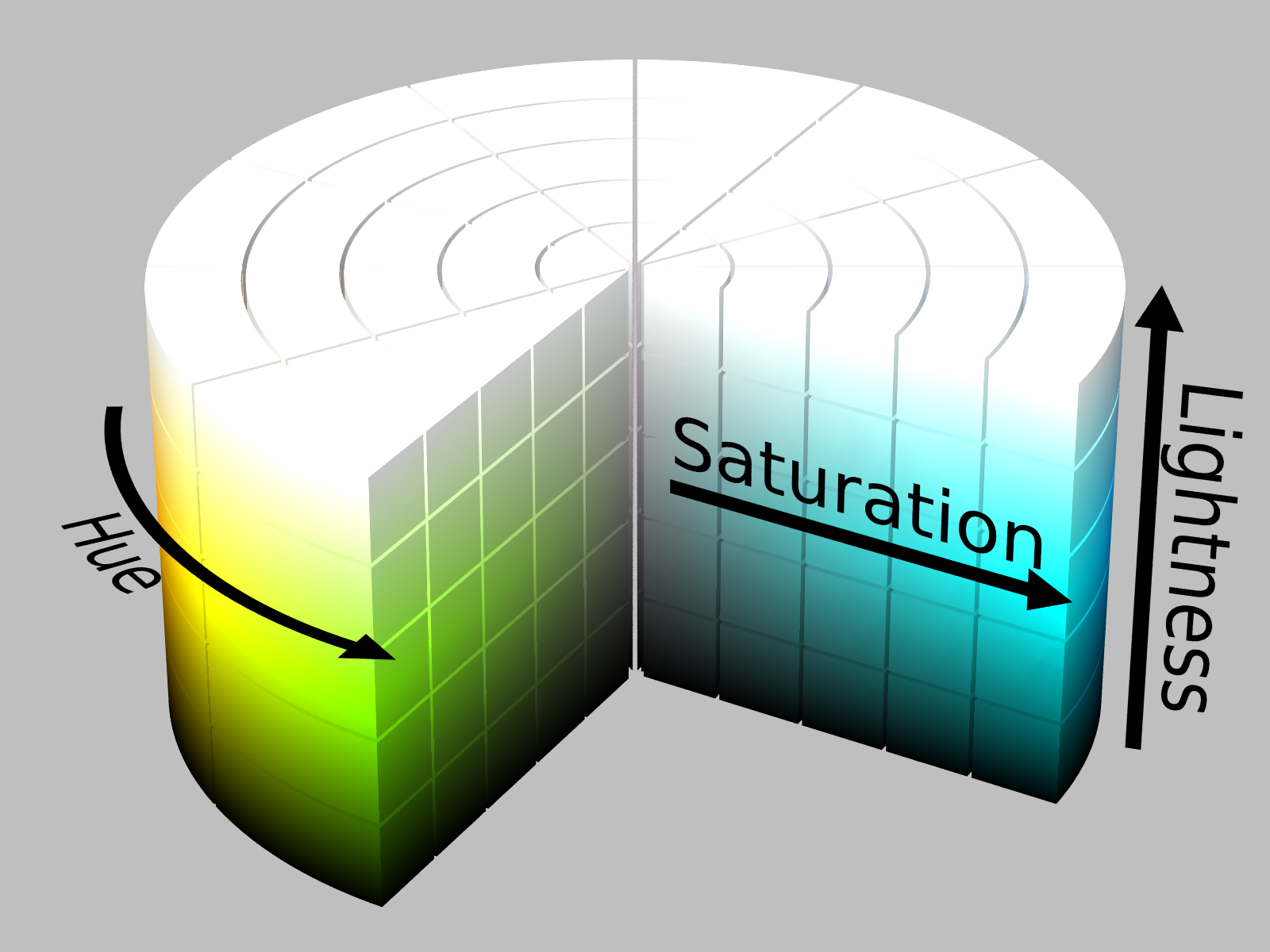
(By the way, RGB is a cube. I don’t know what to do with this information.)
I thought I had it all figured out. Now that I have nice, intuitive ways to represent colours with numbers, I can think about how to add them together. The naive approach would be to average the numbers of Colour A and Colour B, but that runs into problem 3 pretty quickly: just combining colours in this way would, over time, cause most slimes to drift towards the middle-of-the-road saturation and lightness values.
saturation and value fix
So my next thought was, well, why not separate those values and treat them differently? After all, hue is a circle and needs different treatment anyway, so I can split it off into its own category and zero in on Saturation and Lightness. I ended up locking Saturation and Lightness at particular levels determined by the slime’s genome, treating them as discrete values instead of continuous ones - a slime could be any combination of [dull, medium, bright] and [dark, medium, light] (with some special variants thrown in). That solved the problem pretty handily in a way I am still happy with, and all I was left with was hue.
elegant hue mathematics
My first approach gave each slime two hues in their genetics and blended them for display. Blending was simple enough, all I had to do was find the shortest arc between two points on the hue wheel and pick the midpoint. There was one edge case though: what if the two colours were exactly antipodal, 180° apart? My solution was to sidestep the problem entirely and limit the palette to a fixed set of tuned anchor values, and just never let complementary pairs exist.
I laid out nine anchor spokes evenly spaced around the colour wheel at 40° intervals. That 40° divided so nicely into 360°, and because there were an odd number of spokes, no two blends could ever be directly across from each other. Slimes could come in 18 possible hues, 9 derived from the anchor points themselves plus 9 blended midpoints. It felt manageable and moreover it felt kind of clever and elegant. I built a little tool so I could see all my palette at once so that I could adjust the values and really ensure everything worked nicely together, and I was very pleased with myself until I actually loaded up the page.
green hell
IT WAS SO GREEN! Not that green is a bad colour, but take a look at just how dang green it is, and how the greens all kind of tend to look samey.
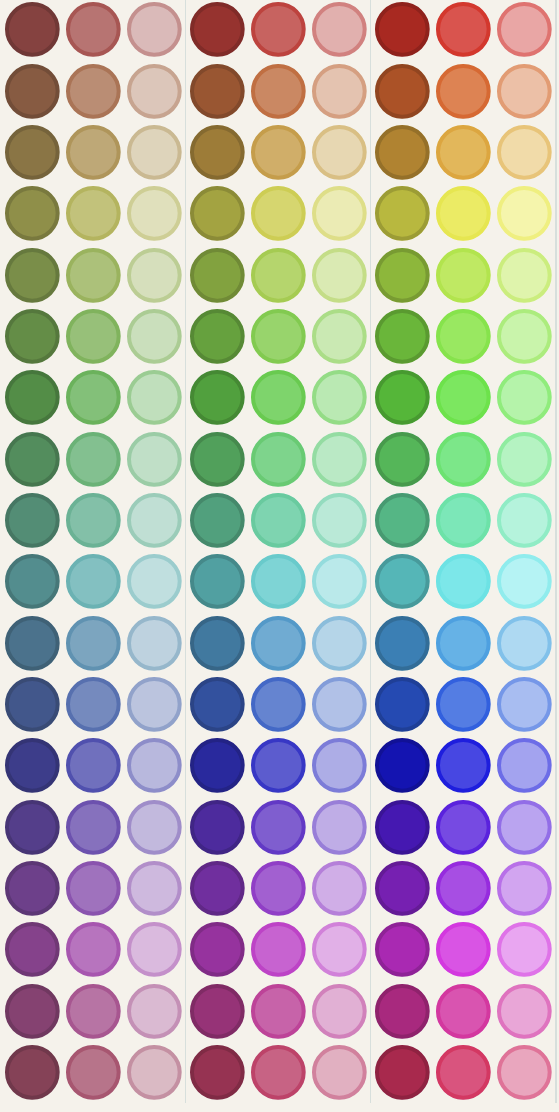
Of all these colours I got one yellow, I got a limp orange, but what felt like oceans of near-identical greens that my stupid human eyes struggled with distinguishing from each other. My solution was nice in terms of geometry but when faced with the reality of human vision, the evenness of my anchor colour split didn’t translate to what FELT like an even palette.
round peg, square hole
My first instinct was to try to fix this by moving the spokes around. Compress the green zone! Push some anchors toward yellow, sacrifice blue, redistribute the space more fairly. It helped a little. Unfortunately, it also immediately introduced new problems. Some of the blends between rearranged spokes landed in weird places, and I had to adjust again, and then again. I made a custom blend table for cross-squishing slimes. Every change I made to the layout had ripple effects.
No matter how I rearranged my nine points, how many spokes I added or took away, the underlying problem was the same: HSL just doesn’t carve up human vision evenly. No amount of manual topology adjustment could change that. I was alphabetizing the FTL ship’s manifest while it drifted towards a black hole (which, coincidentally, is how I ended up here to begin with).
I realised at some point I was fighting against the beautiful system I had built, forcing it into a shape it wasn’t intended to have. With some regret, I went in search of alternative solutions. Sometimes you have to kill your darlings.
oklch is pretty ok (lch)
I realised that if I didn’t want to spend a million years manually eyedropping a colour wheel that what I actually needed was a colour space that did the perceptual work for me. Lucky me, it turns out this exists! I wasn’t the first person to encounter this green problem, and some other folks had already balanced a new kind of colour notation system: OKLCH.
OKLCH is a colour space designed around how humans actually see colour. Its three axes are Lightness (L), Chroma (C - sort of like saturation), and Hue (H). Lightness and Chroma work similarly enough to Lightness and Saturation from HSL that I don’t think it’s worth going over them again, and Hue is still modelled as a 360° circle.
The big change is that OKLCH’s hue wheel is designed specifically to be perceptually uniform: equal angular steps correspond to equal perceived difference in colour. Every 40° of arc looks like roughly the same amount of subjective colour change.
You can really see the difference when they’re side-by-side like this:
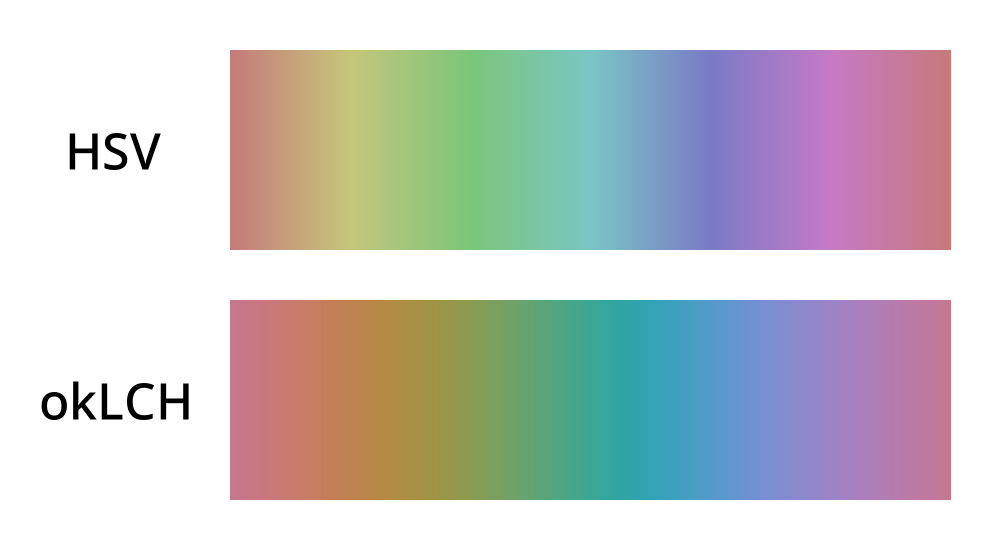
It helped that OKLCH is natively supported in modern CSS (as of 2020) and that OKLCH can be modelled as a cylinder just like HSL can. My math would all still work! Hooray!
solved, and improved!
Finding the right system to work with immediately fixed my main problem of perceptual evenness. With this fixed, I also decided to roll back my anchor hues solution to really open up the colour blending since I was confident I wouldn’t end up with mostly green slimes. Each slime now logically blends with any colour or picks a parent colour to clone, with the chance of cloning increasing depending on how far away the two parent colours are.
Put together, I think this covers all three of my original goals pretty nicely. Slimes mix in a way that makes intuitive sense, there’s room for variance and the occasional surprise result, and the perceptual evenness of OKLCH means the resulting colour space is varied and colourful and will hopefully remain so over the generations. And, as a bonus, it’s a system I can reason about clearly, which sets me up nicely for the mechanical layer I want to build on top of it later.
morals
- sometimes if your system is fighting you, what you need is a new system.
- often, you aren’t the first person to have a problem with something! don’t reinvent the colour wheel!
- just because something is clever doesn’t mean it’s going to be fun or good.
- watch out for the black hole in sector 13 of gamma chiron, it’s a doozy.